A simple guide to iconography
Build a recognizable icon from a circle, a square, or a rectangle.
An icon has to be recognized at a small size. It replaces a word when space is tight, and it still needs a text name for people who do not see it. A custom set can use the product's own geometry, weight, and color. The drawing is simpler than it looks. Most icons are a circle, a square, or a rectangle with one point pulled out of place.
I wrote this guide in 2016 after a GIF by Morgan Allan Knutson: a location icon, drawn in a few seconds. An icon is a circle, a square, or a rectangle, changed by one edit.
These are the original Illustrator recordings from that guide. Each one starts as a basic shape, takes a single kind of edit, and ends on a mark a person should be able to name. The same operations exist in Figma and Sketch.
Start from a shape you already know
Use one frame for the whole set. A 24 by 24 pixel square, with a small margin inside it, keeps neighbors from looking accidental. Circles, squares, and wide or tall rectangles are enough to compare visual weight. Icons that share that weight feel related even when their silhouettes differ.
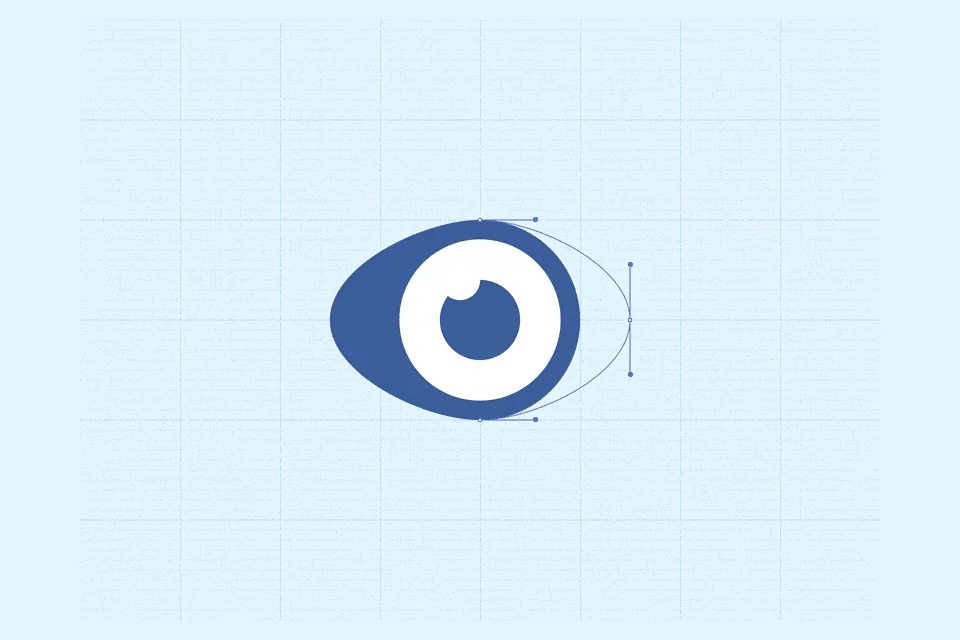
The eye is nested circles. Pull the outer circle sideways until it reads as an almond, then shift the smallest circle so the iris suggests a light. If the icon has to sit on more than one background, subtract the inner circles from the shapes behind them. A white circle painted on top will disappear on a white page.

An arrow can start as a square. Add a point on each side and pull them into a chevron. A thin bent line does the same job with even fewer parts.

A battery is a stroked rectangle, a filled block inside it, and a small rectangle for the cap. Adjust the stroke and the padding until the filled block looks centered.

A bullet list starts as a square. Duplicate it to the right and stretch that copy into a line. Duplicate the pair, leaving a gap the size of the square, until it reads as a list. Circles in place of the squares make a softer row.

A cloud is three circles of different sizes. Sit the two smaller ones on a shared base and place the larger one higher, between them. Deform one of the small circles so the cloud has a bottom.

A fast-forward mark starts as a rectangle. Add a point at the center of one short side, remove the two corners on that side, and a triangle remains. Duplicate it.

A funnel is a rectangle with a point added at the middle of each side. Stretch the top edge.

Play and pause can start as three rectangles side by side. Turn the widest one into a triangle. The group has to read as one control.

The position arrow is a remix of that location icon. Draw a square, then pull the bottom-left point diagonally until it passes the opposite point. Holding Shift keeps the drag at a clean angle.

The location pin is the circle again. Knock a smaller circle out of it, drag the bottom point down, and sharpen that point. A slight radius on the tip keeps it from looking like a needle.

Sound is the funnel turned on its side. Copy it and rotate it a quarter turn.

A wave is a straight line with points at even intervals. Pull every other point down, then round the corners until the line is smooth.

Keep the set in one voice
Make the symbol something a person can name. If a flourish makes the name harder to guess, remove the flourish. The shape has to stay clear.
Test the drawing at 16 pixels. An interactive icon still needs a target large enough to hit. Give it at least 44 pixels on each side, even when the artwork is smaller. Keep one grid so a circle and a square feel like one family. Draw in vectors, and expand strokes before you hand the file off, so the shape does not depend on a live effect in someone else's tool.
Color is optional. One color, taken from the interface, is usually enough. Add another only when it changes the meaning, the way the pupil does in the eye. When an icon has no visible text label, that color needs enough contrast to be seen against the page.
The alphabet is a set of icons too. If you can make these quickly, you can make the one your product is missing. Aim for a shape someone can name without a caption.